So up until now I have focused on my most comfortable zone, the back end of this project. This post will shed some light on the front end. Or at least the bit where most users will be directly interfacing with. I have kept this really simple for now - I did not focus on the autheentication part or any customisations (that will come later). For now I have focused on parsing and displaying the feed sections, the channels from which we get the news so your BBCs, Guardians, and so on. And then drilling down, to the actual news feeds those channels produce. Then on tapping on any of the news items the page gets loaded into the app… I don’t want to navigate away from the application because I wanted to keep the experience “central”. Now if you would rather just get into the code, the repository for the mobile app is here. This repo will keep evolving as I add new features and such so you can keep pulling from master from both the mobile and the back end repositories as I move things forward. Oh and pull requests are always welcome.
Tooling
I had initially planned to use the KMM and individual apps for both Android and iOS. However, after the Google IO announcements with Flutter, and the new updates to the framework, I thought I would use that instead. I am not going to extoll the virtues of using Flutter here but suffice it to say, it helps me prototype things really quickly.
The Set-up
flutter create reader_mobile
This creates a flutter project for my reader allowing me to scaffold the views that I want quickly. I am going to be suing some state management here and the usual HTTP IO and JSON parsing libraries. and so to that end this is what my pubspec.yaml looks like
name: mildly_skilled_reader
description: A new Flutter project.
publish_to: 'none' # Remove this line if you wish to publish to pub.dev
version: 1.0.0+1

environment:
  sdk: ">=2.12.0 <3.0.0"

dependencies:
  flutter:
    sdk: flutter
  cupertino_icons: ^1.0.2
  flutter_riverpod: ^0.14.0+3
  intl: ^0.17.0
  google_fonts: ^2.1.0
  shared_preferences: ^2.0.3
  webview_flutter: ^2.0.8

dev_dependencies:
  flutter_test:
    sdk: flutter
I’m going to be using webview_flutter to render the pages that the feeds present, riverpod for the state management, and shared preferences to deal with things like personalisation, which comes further down the line.
Some Screenshots
We start off with the front matter. Currently the home screen will just be partitioned by whatever categories I had in my OPML file and will also display the news channels. This is going to change over time as I want to make it so that it’s not just something I use, I would like to make the application a bit more flexible moving forward, so things like creating new sections, displaying news by section and such.
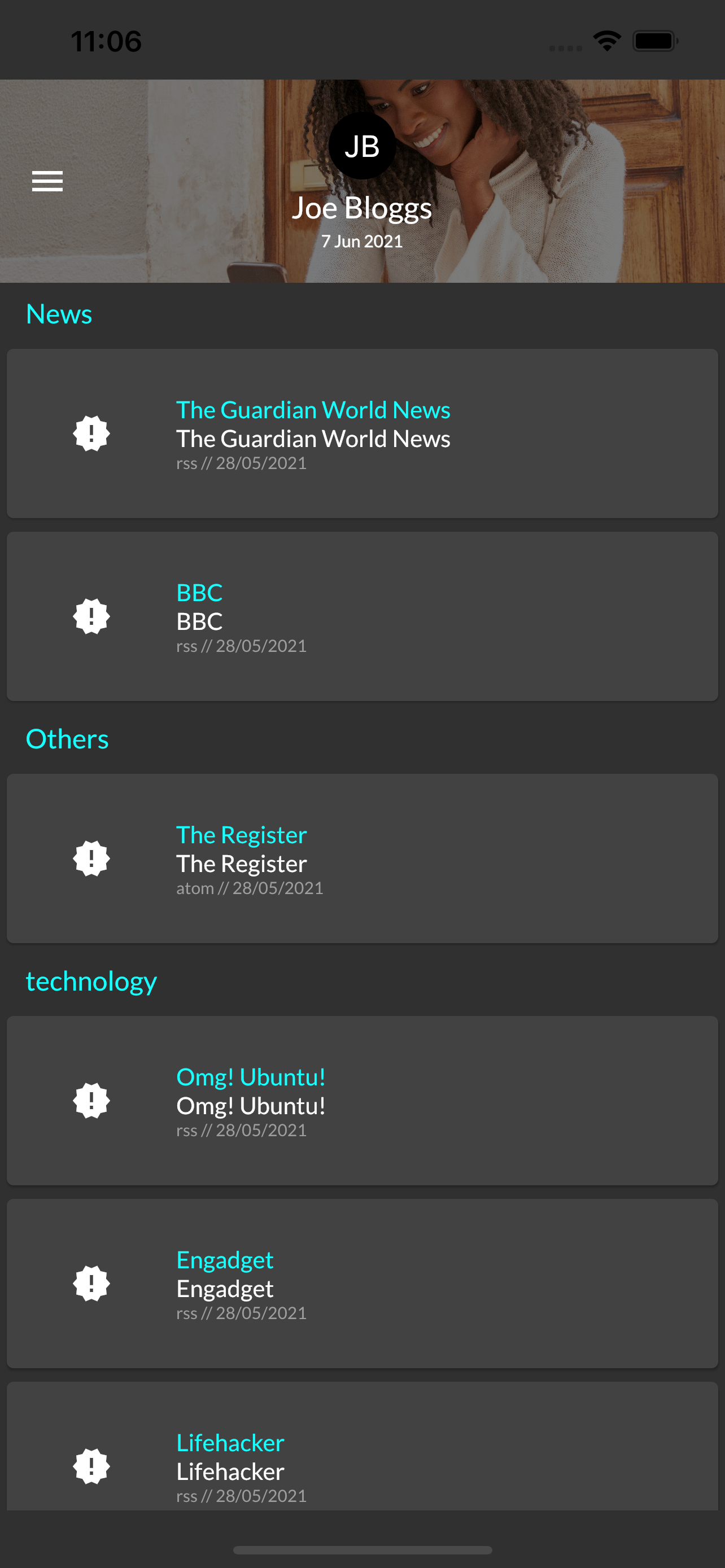
So far this is what I have, this will get all straightened out in later iterations, this is code that gives me this look.
import 'package:flutter/material.dart';
import 'package:flutter_riverpod/flutter_riverpod.dart';
import 'package:mildly_skilled_reader/model/user_feed.dart';
import 'package:mildly_skilled_reader/provider/news_providers.dart';
import 'package:mildly_skilled_reader/screens/feed/feed_tile.dart';

class FrontMatter extends ConsumerWidget {
  @override
  Widget build(BuildContext context, ScopedReader watch) => SliverList(
          delegate: SliverChildListDelegate(
        watch(userFeedProvider).when(
            error: (error, stack) => [Icon(Icons.dangerous_sharp)],
            loading: () => [CircularProgressIndicator()],
            data: (feed) => feed.sections
                .expand((section) => parseSection(section))
                .toList()),
      ));

  List<Widget> parseSection(Section section) => section.feeds.isNotEmpty
      ? <Widget>[
            Padding(
              padding: const EdgeInsets.only(left: 15, top: 8.0, bottom: 8.0),
              child: Text(
                section.name,
                style: TextStyle(color: Colors.cyanAccent, fontSize: 16),
              ),
            )
          ] +
          section.feeds.map((feed) => FeedTile(feed)).toList()
      : [];
}
I am using the riverpod to sort out any state management. In this instance I’m using the consumer widget to get the feed that comes back from my provider’s request to the back-end that I prepared previously. The only interesting thing that I am doing in this code here is parsing the user feed. I’m basically “flatmapping” the sections into a sliver list here.
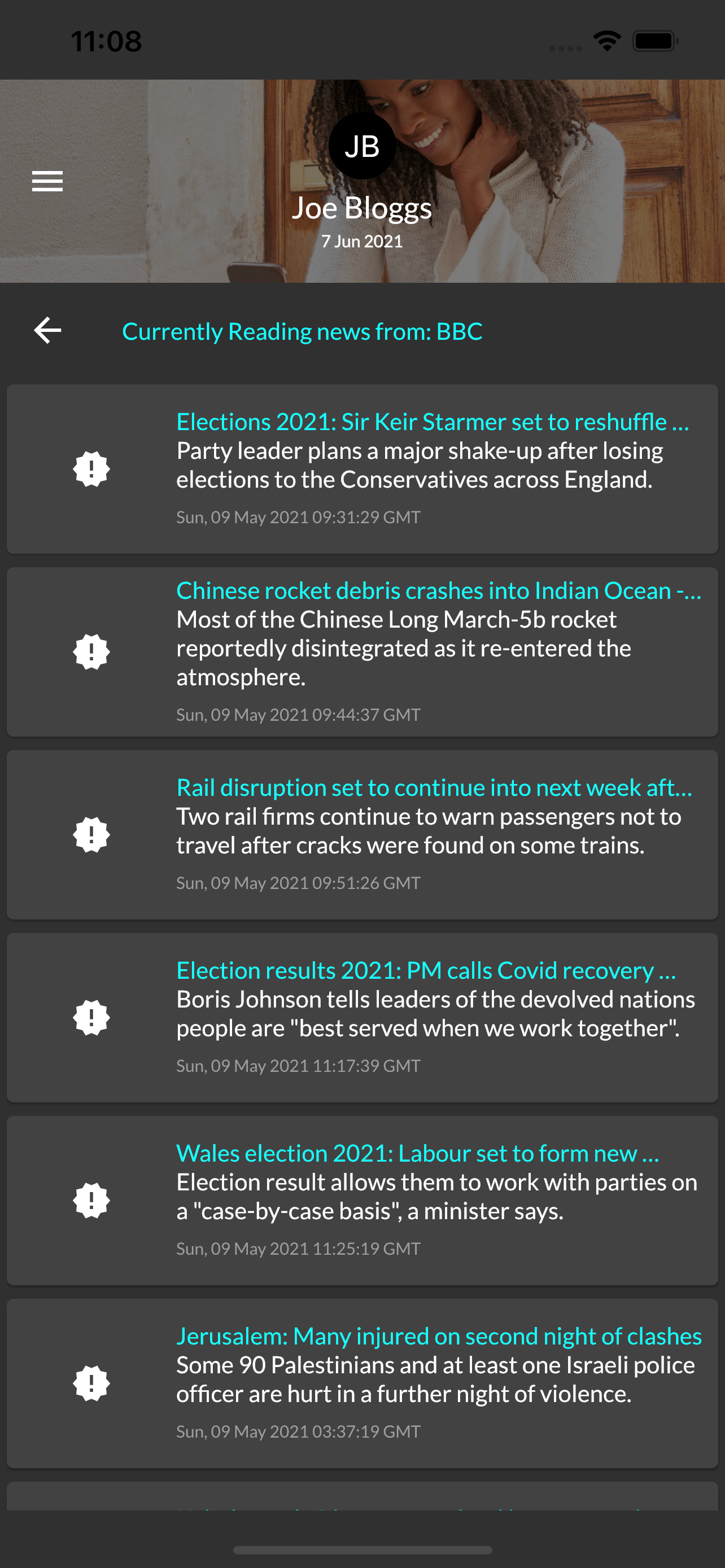
This is the BBC feed (RSS) parsing it out into a title and description along with the publish date and time. This will be the screen that will seqway into the actual news item.
import 'package:flutter/material.dart';
import 'package:flutter_riverpod/flutter_riverpod.dart';
import 'package:mildly_skilled_reader/model/user_feed.dart';
import 'package:mildly_skilled_reader/provider/news_providers.dart';
import 'package:mildly_skilled_reader/screens/feed/news_tile.dart';

class NewsFeedPage extends ConsumerWidget {
  const NewsFeedPage(this.feed);

  final Feed feed;
  @override
  Widget build(BuildContext context, ScopedReader watch) => SliverList(
          delegate: SliverChildListDelegate(
        watch(newsFeedProvider(feed.id)).when(
            error: (error, stack) {
              return [Icon(Icons.dangerous_sharp)];
            },
            loading: () => [CircularProgressIndicator()],
            data: (newsFeed) =>
                <Widget>[
                  ListTile(
                    onTap: () => Navigator.pop(context),
                    title: Text(
                      "Currently Reading news from: ${feed.name}",
                      style: TextStyle(color: Colors.cyanAccent, fontSize: 14),
                    ),
                    leading: Icon(Icons.arrow_back),
                  ),
                ] +
                newsFeed.newsItems
                    .map((newsItem) => NewsTile(newsItem))
                    .toList()),
      ));
}
Once again using the ConsumerWidget to deal with state once that feed comes in from the back end. Just mapping over the list returned by the backend into news tiles. At the moment I’m just mocking the responses right now.
Here’s what the providers look like
import 'package:flutter_riverpod/flutter_riverpod.dart';

import 'package:flutter/services.dart' show rootBundle;
import 'dart:convert';
import 'package:flutter/services.dart';
import 'package:mildly_skilled_reader/model/news_feed.dart';
import 'package:mildly_skilled_reader/model/user_feed.dart';

final userFeedProvider = FutureProvider<UserFeed>((ref) async {
  return rootBundle.loadString('assets/json/news_feed.json').then((userFeed) {
    return UserFeed.fromJson(json.decode(userFeed));
  });
});

final newsFeedProvider =
    FutureProvider.family<NewsFeed, String>((ref, id) async {
  return rootBundle.loadString('assets/json/bbc_feed.json').then((newsFeed) {
    return NewsFeed.fromJson(json.decode(newsFeed));
  });
});
You can see where we plug in the actual API requests and ao on. This should give us some guarantees that the data coming back from the back end (where I took this mock data) will be parsed correctly. Albeit, there are somethings about the backed data that I still need to clean up, such as the dates which are currently being handled as strings. The dates are important because it allows me to determine the “freshness” of a feed and whether to refetch or not.
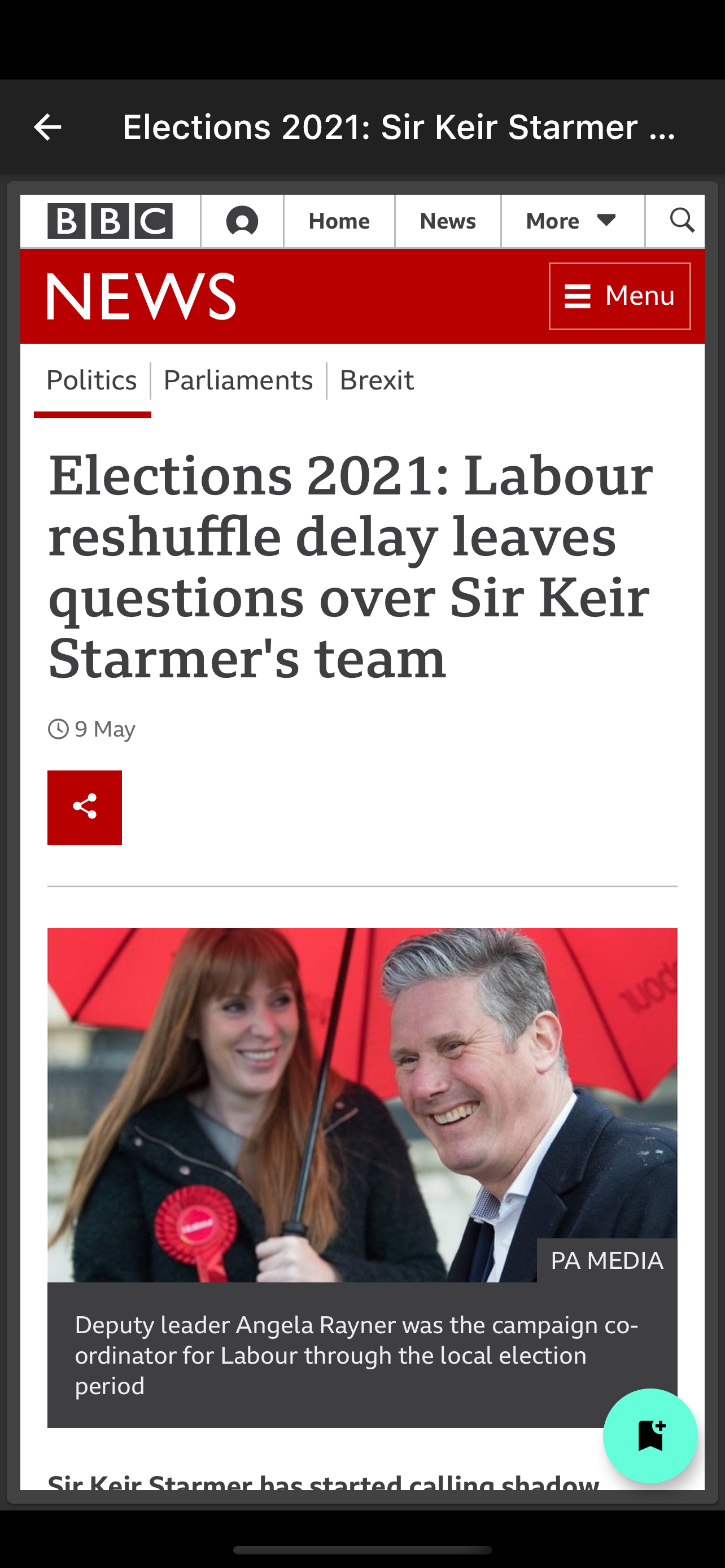
This final screen here allows me to embed the actual web page into the app itself… As you can see I can wrap it in anything that I want, even add a floating action button to enable me to bookmark this page for later. I got some really good ideas from here. As with my usual posts this comes with a repository.

Share this post
Twitter
Google+
Facebook
Reddit
LinkedIn
StumbleUpon
Pinterest
Email